
Bangbet Nigeria app for Android and iOS
The Bangbet Nigeria mobile app brings sports betting, Aviator, slots, and live casino to your phone. It runs on Android 5.0 and above, and iOS 12 and above. The app is free to download, weighs under 30 MB, and connects to the same NLRC-licensed account you use on desktop.


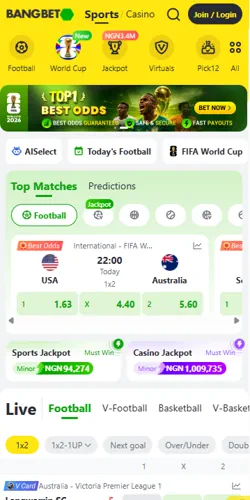
What the Bangbet Nigeria app offers
The app is not a stripped-down version of the website. You get the full sportsbook with over 30 sports including the NPFL, EPL, La Liga, and NBA. Live betting works in real time with odds refreshing as the match progresses. The casino section loads Aviator by Spribe at 97% RTP, slots from Pragmatic Play and PG Soft, and live dealer tables from Evolution running 24 hours a day.
Compared to using the mobile browser, the app loads faster because it caches static assets locally. On a standard MTN or Airtel 4G connection in Lagos, the app lobby typically opens in under two seconds after the first session. The browser version on the same connection averages three to four seconds. Push notifications are available in the app but not via mobile browser, so you get alerts on odds changes and bonus offers the moment they go live.
How to install the Bangbet Nigeria app
Android installation requires one setting change because the APK file comes directly from Bangbet Nigeria rather than the Google Play Store. That is normal for Nigerian betting apps and takes about 30 seconds to allow. iOS users install through the App Store with no extra steps required. Both versions are free and the download file is under 30 MB, so it works fine on a standard mobile data connection.
Android install
- Tap the Android download button on this page
- Open your phone Settings and go to Security or Privacy
- Enable "Install from unknown sources" or "Allow from this source"
- Open the downloaded APK file from your notifications bar
- Tap Install and wait about 15 seconds
- Open the app, log in or register, and deposit from NGN 100
iOS install
- Tap the iOS download button on this page
- You will be redirected to the App Store listing
- Tap Get and confirm with Face ID, Touch ID, or Apple ID password
- Wait for the download to complete, usually under 30 seconds on WiFi
- Open the app and log in or register your Bangbet Nigeria account
- Deposit in Naira using OPay, PalmPay, or Kuda Bank
Device requirements and app specifications
The Bangbet Nigeria app runs on most phones sold in Nigeria from 2017 onwards. Tecno, Infinix, Itel, and Samsung devices with Android 5.0 or above all work. For iOS, an iPhone 6 or newer running iOS 12 is sufficient. The app does not support tablets officially, though it functions on most Android tablets in phone layout. It is not available for Windows Phone or BlackBerry OS.
| Specification | Android | iOS |
|---|---|---|
| Minimum OS version | Android 5.0 (Lollipop) | iOS 12 |
| File size | Under 30 MB | Under 30 MB |
| Download source | Direct APK from Bangbet Nigeria | App Store |
| Minimum RAM | 1 GB | 1 GB |
| Biometric login | Fingerprint supported | Face ID and Touch ID |
| Push notifications | Yes | Yes |
| Cost | Free | Free |
Deposits and withdrawals inside the app
Every payment method available on the Bangbet Nigeria website works in the app too. OPay and PalmPay remain the fastest options, crediting your balance in under 10 seconds. Kuda Bank and Paga take a few minutes. Flutterwave handles Visa and Mastercard payments. USDT is available for crypto users and processes within 30 minutes, which is faster than any bank transfer option.
Withdrawals from the app follow the same rules as the website. Minimum payout is NGN 500 and there is no fee charged by Bangbet Nigeria on standard withdrawals. OPay and PalmPay withdrawals arrive within one to three hours. Bank transfers take up to 24 hours. If your KYC is not completed, your withdrawal limit stays capped until ID verification clears, which typically takes one to two business days. Players in Port Harcourt and Kano report completing the full KYC flow inside the app in under five minutes using a phone camera to capture their National ID.
Open Account